Lumber Zoo
- 4.7
- Rating
- 10.00K
- Installs
- Free
- Price

 Analysis by App-foxy
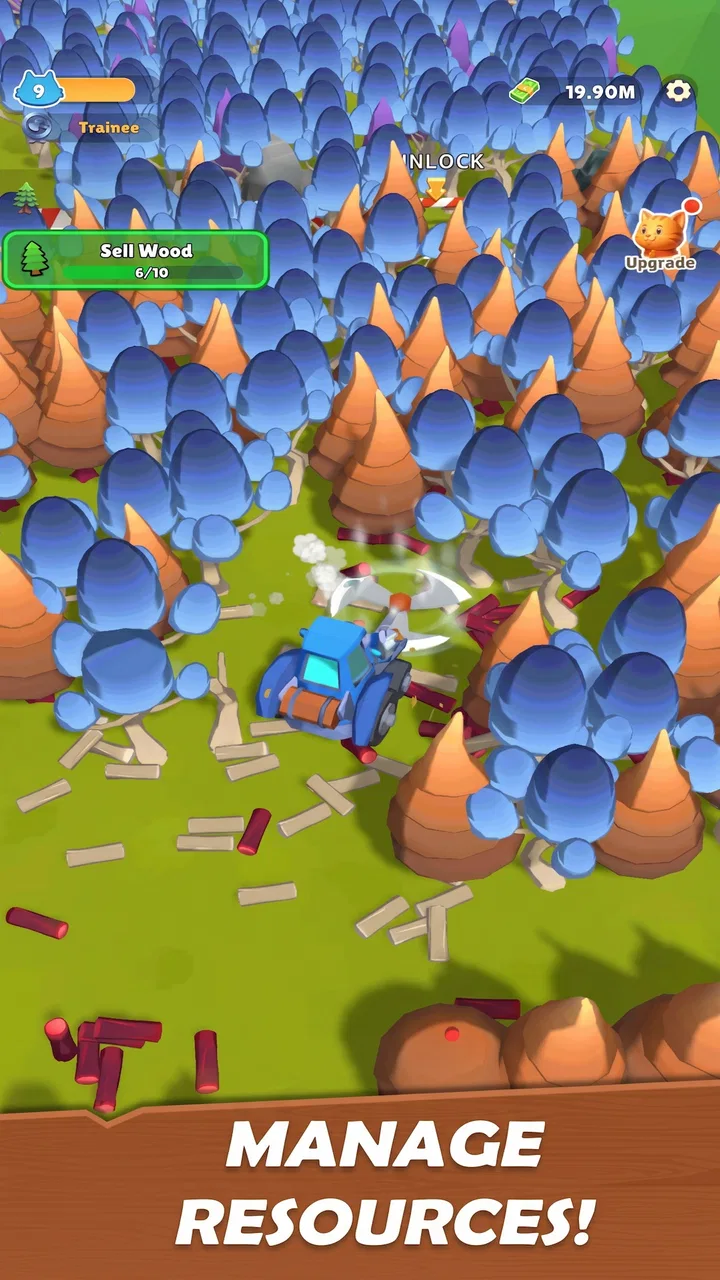
I went into Lumber Zoo expecting a light arcade game, and that is exactly where it fits best: a simple, cheerful loop built around chopping timber, selling it, and improving the little animal crew doing the work. It is made by Seikami, costs nothing to start, and carries an Everyone age rating, so the presentation is easy to approach even if you do not usually play management games.
The basic idea is immediately readable. Your animals gather wood, you turn that work into money, and you spend the return on upgrades that help the operation move forward. The appeal is not a complicated story or a deep simulation. It is the small satisfaction of seeing a modest lumber operation become more capable one decision at a time. I found it most enjoyable in short sessions, especially when I wanted something active enough to hold my attention but relaxed enough not to demand complete concentration.
What to expect when you start
The first thing to understand is that this is an arcade-style progression game, not a detailed forestry simulator. The cute animal crew gives the setting its personality, while the timber business supplies the reason to keep tapping, collecting, selling, and upgrading. If you enjoy watching a small operation become more efficient, the central loop is easy to appreciate.
You May Also Like

 AccuWeather: Weather Radar
AccuWeather Review: A Quick, Clear Forecast for Everyday Decisions
For everyday plans, the best forecast is the one you can understand quickly. AccuWeather makes rain timing, radar, and local conditions easy to act on, with a few trade-offs.

 Hill Climb Racing
Why Hill Climb Racing Still Turns Crashes Into One More Run
A tiny car, a bumpy hill and one more upgrade: Hill Climb Racing keeps resurfacing because its simple chaos makes every near-miss feel personal.

 AliExpress - Shopping App
AliExpress Makes Global Shopping Feel Personal, but Shoppers Bear the Risk
AliExpress turns a global marketplace into a pocket-sized discovery engine. Its reach is useful, its shopping loop compelling, and its trade-offs easy to miss.

 Lords Mobile: Kingdom Wars
Lords Mobile Is a Kingdom-Building Routine, Not a Quick Match
A case-by-case verdict on the building, battles, device demands, and social commitments that make Lords Mobile rewarding for some players and exhausting for others.

 PDF Scanner app - TapScanner
TapScanner Makes Paperwork Easier to Capture, Check, and Share
TapScanner makes scanning with a phone feel less like a rescue operation and more like a dependable step in getting work done. Its capture tools are useful, though not flawless.

 Block Blast!
 Shows How Much a Puzzle Game Can Leave Out
A quiet grid game shows why puzzle players increasingly value instant clarity, repeatable skill and low-pressure play—and where the genre still needs to catch up.
More From Our News Desk
View All News


At the beginning, the important question is not how quickly you can unlock everything. It is how you turn each early action into a smoother next action. Chopping produces the resource that makes the rest possible, selling converts that resource into spending power, and upgrades determine whether your next cycle feels noticeably better. That rhythm gives the game its momentum without burying the player under a large number of systems.
I would describe the tone as friendly rather than intense. The animal-led presentation softens the workmanlike subject, and the short arcade structure makes it suitable for brief breaks. It is a good fit for someone who wants a game that explains itself through repeated actions instead of lengthy instructions. It is less suitable for a player looking for a large world, complex character builds, competitive multiplayer, or a long narrative campaign.
The game has attracted a 4.7 average from around 296 ratings, with roughly 29 written reviews and over 10K installs. Those figures suggest a small but enthusiastic audience rather than a huge, established platform. I would treat that as useful context: the experience feels like a focused casual project, not an enormous live-service game with a broad catalogue of content.
There is also a practical point for families. The Everyone rating makes the presentation approachable, but that does not mean every player will enjoy the same pace. Younger players may like the animals and immediate actions, while older players may be more interested in planning upgrade spending. I would still show a child how purchases work before handing over the device, because optional in-app items cost $4.99 each.
Why the loop works for short sessions
The strongest part of the design is the clear relationship between effort and improvement. You do not need to remember a complicated chain of menus to understand what you are doing. A useful session can be as simple as gathering enough timber, selling it, choosing an improvement, and noticing whether the next run feels more productive.
That clarity makes it easy to return after a break. I do not feel punished for forgetting a detailed quest line or missing a limited event. The trade-off is that the same simplicity can become repetitive if you expect every session to introduce a new mechanic. The game works best when the repeated loop itself is the point.
A realistic use case is a ten-minute wait before an appointment. I can open the game, complete a few work cycles, spend the earnings deliberately, and close it without needing to reach a chapter ending. On a longer journey, however, I would want more variety than this compact structure appears designed to provide. It is a pocket activity, not a replacement for a full strategy game.
Getting through the first setup
The current release is version 0.1.4 and requires Android 7.1 or later. That makes the technical entry point fairly accessible for many Android users, although the exact feel will still depend on the phone or tablet you use. I recommend starting with a few uninterrupted minutes rather than launching it while rushing between tasks, because the opening actions are where you learn how the economy is meant to flow.
On the first pass, I would resist the urge to spend immediately. Look at what the game presents as the next improvement and ask what it changes: does it help you produce timber, handle more of it, or reach the next sale more comfortably? Even when the interface is simple, this habit prevents random spending. Early resources are more valuable when they remove a bottleneck instead of merely making one number look larger.
Your first useful goal is not maximum speed; it is a repeatable cycle. Chop enough to create a meaningful stock, sell it, and use the proceeds on an upgrade that helps you repeat the process. Once that pattern feels natural, the game becomes much easier to read. You stop treating each tap as an isolated action and start seeing a small production chain.
One of the less obvious adjustments is to watch the timing of your actions rather than tapping without looking. If the game is showing a completed resource or a ready sale, acting at that moment keeps the loop tidy. If you spend before understanding what the next cycle needs, you may find yourself waiting for a resource you could have planned around. The game is simple, but simple games still reward attention to sequence.
I also suggest using the first session to learn the visual language of the animal crew. Cute characters can make a game feel self-explanatory, but the important information is usually in the state of the operation: what is ready, what is waiting, and what an upgrade will improve. Focusing on those signals helps you make decisions based on the economy rather than on decoration alone.
Making the first successful sale meaningful
The first sale is the moment the concept clicks. Before it, chopping can feel like a standalone action. After it, you understand that timber is only useful when it moves through the complete loop. I recommend treating that first sale as a test of your routine: gather, check what is available, sell, and then pause before buying anything.
That pause matters because the most tempting upgrade is not always the most useful one. If one improvement increases output while another helps you process or sell what you already gather, the better choice depends on where your current delay occurs. When production is waiting on the crew, improve production. When timber is accumulating without a comfortable way forward, prioritize the part that clears that blockage.
This is a practical tip I would give to a friend: after every upgrade, play one full cycle before buying another. That gives you a chance to feel the change instead of stacking purchases blindly. It also reveals whether the improvement solves a real problem or simply looks attractive in the menu. In a compact game, that kind of comparison is more useful than trying to calculate a perfect long-term build.
The first meaningful success should therefore be measured by control, not by a particular total. You know you are ready for the next stage when you can explain why you are chopping, when you intend to sell, and what your next purchase is meant to fix. That understanding is more valuable than rushing through the opening and then wondering why progress feels uneven.
Where new players may get confused
The main source of confusion is likely to be the difference between having a resource and having useful progress. Chopping alone may feel productive, but the timber has to be sold before it can fund improvements. Likewise, buying an upgrade is not automatically progress if it does not support the way you are currently playing. The game’s loop is straightforward, yet its economy still asks you to connect the steps.
Another common mistake is assuming that the cutest or most visible element deserves priority. The animals are the emotional centre of the presentation, but your best decision should come from the current state of the timber operation. Watch what is slowing you down. If the crew is active but your stock is not turning into spending power, more gathering may not be the answer. If sales are easy but production feels slow, the opposite may be true.
Players may also wonder whether they need to buy anything to enjoy the game. I was able to approach it as a free arcade experience, and the core attraction is the chop-and-upgrade loop rather than the purchase itself. Still, optional items priced at $4.99 each create a decision point. I would not spend until I knew exactly what problem the purchase solved and whether I was enjoying the normal progression.
That advice is especially important for younger players. The Everyone rating describes the content, not a spending strategy. If the game is being used on a shared device, agreeing on a purchase rule beforehand avoids turning a harmless short session into an unwanted charge. For adults, the same principle applies: play long enough to decide whether the loop has staying power before paying for convenience.
How it compares with other arcade choices
Compared with a traditional reflex arcade game, Lumber Zoo is calmer and more persistent. You are not relying only on reaction speed or trying to survive a single difficult run. Your actions feed an ongoing improvement path, which gives each short session a reason to continue. That makes it a better choice for players who like visible growth but do not want a demanding challenge every minute.
Compared with a full management or tycoon game, it is much lighter. You will not approach it expecting detailed staffing, complex markets, elaborate construction, or a broad economic model. Its advantage is accessibility: the game gets to the satisfying part quickly. Its limitation is that players who want layers of planning may reach the edge of its appeal sooner than players who enjoy a clean, repeatable loop.
It also differs from idle games that ask you to leave progress running in the background. Here, I get more value from making the actions myself and paying attention to the relationship between chopping, selling, and upgrading. If your favourite games are mostly about checking in occasionally and collecting accumulated rewards, this may feel more hands-on than you want. If you prefer active involvement without complicated controls, that hands-on quality is a strength.
Who should play and who should skip it
I would recommend it to someone who wants a friendly arcade game with a small business-like progression loop. It suits players who enjoy turning a basic action into a more efficient routine, and it is approachable for first-time management-game players because the objective is easy to understand. The animal crew adds enough charm to keep the presentation from feeling like a spreadsheet.
I would be more cautious recommending it to anyone who needs constant novelty. The central actions are deliberately repetitive, and that is both the source of its comfort and its biggest limitation. If you need deep exploration, a large collection of activities, or a story that keeps changing direction, another category will probably serve you better.
It may also be a poor fit for someone who dislikes upgrade economies altogether. Even though the controls are uncomplicated, the satisfaction comes from deciding how to turn one cycle into a better cycle. Without enjoying that progression, the chopping and selling can feel like chores rather than play.
For a first-time user, my suggested route is simple: install it on a compatible Android device, complete the opening chop-and-sale loop, study what each early improvement changes, and then play one full cycle after every purchase. Do not judge it by how many upgrades you can buy in the opening minutes. Judge it by whether the next cycle feels clearer and more satisfying than the last.
That approach also answers the question of how much time it demands. You can use it in short bursts because the main loop does not require a long narrative commitment. At the same time, the game is more rewarding when you stay alert to your bottleneck instead of tapping automatically. A few focused minutes can be enough for a useful session, while longer play depends on how much you enjoy repeating and refining the same process.
Seikami has kept the entry point inviting, and the free price makes trying it straightforward. The current version gives curious players a low-risk way to see whether this particular mix of cute animals, timber work, and arcade progression matches their taste. Just keep the in-app purchase option in mind and decide your spending limit before you begin.
My final impression is positive but specific: this is a pleasant choice when I want a compact game with an understandable goal and a visible sense of improvement. Its best moments come from making the first sale, identifying what slows the crew down, and choosing an upgrade that genuinely improves the next round. If you enjoy small, satisfying progress more than constant surprises, Lumber Zoo is worth trying; if you want depth, variety, or high-pressure arcade action, I would look elsewhere.
FAQs for Lumber Zoo
01What is Lumber Zoo, and how does it work?
Lumber Zoo is a mobile game available for Android and iOS that combines strategy and time management. Players manage a virtual zoo where animals help collect and process lumber. The goal is to expand the zoo, unlock new animals, and optimize resource collection. The game features vibrant graphics and engaging gameplay mechanics.
02Are there in-app purchases in Lumber Zoo?
Yes, Lumber Zoo offers in-app purchases. Players can buy coins and gems to speed up progress, unlock special animals, or acquire exclusive items. While the game is free to download, these purchases provide additional convenience and customization options. However, the game is designed to be enjoyable without spending money.
03Can Lumber Zoo be played offline?
Lumber Zoo requires an internet connection for most features, including synchronization of progress and access to online events. Offline play is limited, and certain functionalities may not be available without a connection. It's recommended to have a stable internet connection to fully enjoy all aspects of the game.
04Is Lumber Zoo suitable for children?
Lumber Zoo is designed for a wide audience, including children. It features colorful graphics and simple mechanics that are easy to understand. The content is family-friendly, and parents can use in-app settings to manage purchases and screen time, making it a safe choice for younger players.
05How can I ensure my progress is saved in Lumber Zoo?
To ensure your progress is saved in Lumber Zoo, connect the game to a social media account or a cloud service like Google Play Games or Apple Game Center. This will allow your progress to sync across devices and protect it from being lost if the app is deleted or the device is changed.
Pros
- Engaging and colorful graphics enhance user experience.
- Intuitive controls make gameplay easy for all ages.
- Regular updates keep content fresh and exciting.
- Interactive challenges promote strategic thinking.
- Suitable for both short and long play sessions.
Cons
- In-app purchases can become quite expensive.
- Occasional ads might disrupt gameplay.
- Requires a stable internet connection.
- Some levels may feel repetitive over time.
- Limited offline play options available.

Lumber Zoo
Gallery